

What are webhooks?
The TruckDown API is more than just a bunch of endpoints that allows you to run a search and retrieve location profiles. It is a central communications hub that allows you to message locations in real-time as a part of your work-flow to make repairs go smoothly and allow trucks to get back on the road faster.
In order to enable this, our system has to be able to send messages into your system and the way we do this is with webhooks. Enabling a webhook into your system allows us to send messages into your system based on customer triggers, such as a status updates on a service request or a customer submitting information or a question.
Requirements for webhooks
To enable webhooks, your system has to have a publicly accessible endpoint that can accept POST http requests from TruckDown. The BODY of the http request will contain a JSON object of a webhook message in the following format:
{
    "type": string, //For service requests the type will be "service-request".  For validation codes the type will be "validation-code".
    "title": string, //The title of the message, typically "TruckDown Service Request" for Service Request Messages or "Verification Code" if senbding verification codes
    "message": string, //The message
    "link": string, //may be null - if applicable provides a link to the item references in the message (i.e. to the service request if it is a service request message)
    "properties": {
        "name": string
    },
        //object with available properties for the message.  All messages include a "type" property.
        //For service requests the type will be "service-request".  For validation codes the type will be "validation-code".
        //Additional properties will be included based on the type of message.
    "address": {
        "accountId": string, //the account id this message is being sent to
        "address": string, //the url the http POST was submitted to
        "isVerified": boolean, //a flag to determine if the address had been previously verified by a TruckDown verification code
        "format": 0 //for standard webhools this is always 0 (for JSON)
    },
    "options": {
        "suppressLog": boolean //a flag to specify if internal logging was suppressed for this request
    }

}
Webhooks message properties
The properties included with a webhook message is dependent on the type of message sent. Currently, there are two types of messages - a "verification-code" message and a "service-request" message.
verification-code
verification-code messages contain two additional properties:
- "code": a 6 digit code that can be used to validate the webhook endpoint.
- "expiry": a utc date/time for when the code expires. After this time the code cannot be used for verification.
service-request
service-request messages contain two additional properties:
- "request-id": the id of the service request in question. This id can be used to retreive the request information and messages.
- "action": the type of action taken on the service request that triggered the notification. The possible action types include:
- "New" - a new request was submitted
- "Acknowledge" - a vendor acknowledged a request
- "Approve" - a request was approved
- "Cancel" - a request was cancelled
- "Close" - a request was closed
- "Complete" - a request was completed
- "Transfer" - a request was transferred to another user
- "Decline" - a request was declined
- "Message" - a new request message was sent
- "File" - a PDF file was uploaded
- "Image" - an image was uploaded
- "ContactRequest" - a contact request was made on a closed request
Securing and validating webhooks
Whenever TruckDown sends a webhook message, we sign the message contents using your accounts webhook verification token and add a "X-TruckDown-Signature" header to the request with the value of the signed message. You can use this header value to verify that the message legitimately comes from TruckDown and to ensure the validity of the message contents.
You can view your webhook verification tokens by going to Admin -> Account Administration -> Integrations.
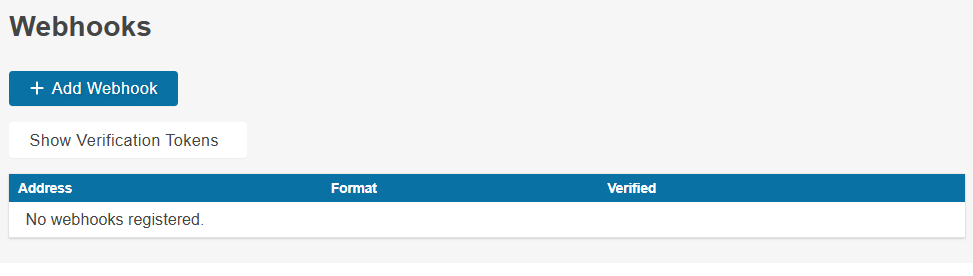
Click on the "Show Verification Tokens" button to display your current and next verification tokens.
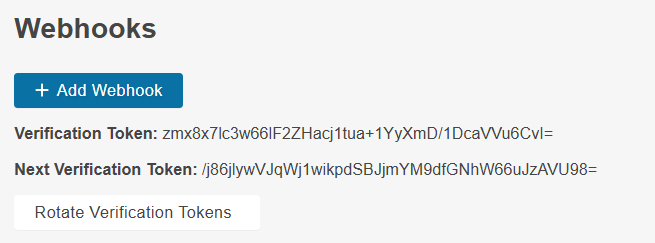
In your implementation, you can check the signature using both your verification tokens to prevent any missed messages should you rotate your tokens. Rotating your tokens will cause the "next" token to move to the current state and will create a new token for the "next" one. Note: you can retrieve your webhook verification tokens using the relevant endpoint in our API.
In order to verify a webhook message, you need to:
- Create an identifier for the message which a string that consists of: "[address.accountId]:[type]:[title]:[message]".
- Convert your verification token from a Base64 string to a byte array.
- Hash the identifer using the HMAC SHA512 algorithm and the key generated from the verification token.
- Compare the hashed value to the value of the "X-TruckDown-Signature" header on the request. If it matches then the request originated from the TruckDown system.