

Log in or create a new account
Click here to login or register a new account. Creating an account is free and will allow you to create an API authorization token so you can access the TruckDown API. Once completed, you will be redirected here.
Get your API Authorization Token
Go to Admin -> Account Administration -> Integrations to access or create a new API Authentication Token.
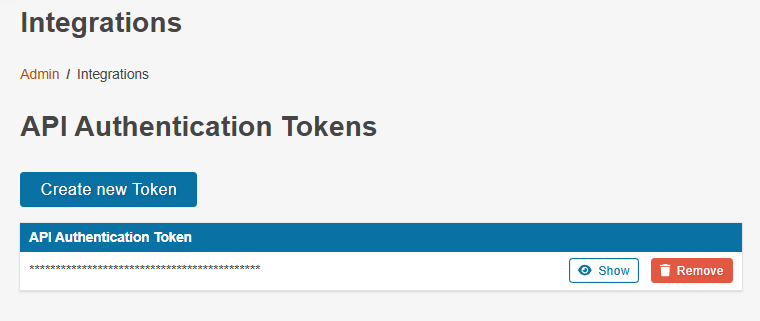
Click the "Create New Token" button to have the system generate a new authentication token for you. You can add new tokens or remove existing tokens at any time. Once you have a new token created, click the "Show" button to display your token value. Clicking the
Save this token value in a secure location as you will need it for every API request you make.
Test API access
Make a request in your language of choice to test access to the TruckDown API. The example below hits an endpoint that returns the information on the currently logged in user. If you are not properly logged in the request will return a 401 (unauthorized) response. If authenticated properly, it will return a JSON object with your user information.
Note: Postman is an easy and free tool for testing API requests and viewing the responses.
Curl
curl -X 'GET' \
  'https://api.truckdown.com/client/accounts/get-context-information' \
  -H 'Accept: application/json' \
  -H 'Authorization: Bearer [YOUR API AUTHORIZATION TOKEN]'
Javascript Fetch
fetch('https://api.truckdown.com/client/accounts/get-context-information', {
    method: 'GET',
    headers: {
        'Accept': 'application/json',
        'Authorization': 'Bearer [YOUR API AUTHORIZATION TOKEN]'
    }
})
Authentication For Fleet Accounts
With a Fleet account, you can use an API authorization token to login as any of the users on your account. This requires the API authorization token to be associated with an Admin user on your account.
To login as another user on your account, you can use BASIC authorization for your requests with the username set to the User Id you want to login as and the password set to your API authorization token.
Javascript Fetch
fetch('https://api.truckdown.com/client/accounts/get-context-information', {
    method: 'GET',
    headers: {
        'Accept': 'application/json',
        'Authorization': 'Basic BASE64Encode([UserID]:[YOUR API AUTHORIZATION TOKEN])'
    }
})
To login as another user your API authorization token must be associated with an Admin user on your account and the User ID must link to another user on your account.
Authentication For Enterprise Accounts
With an Enterprise account, you can use an API authorization token to login as any of the users you have created through the Enterprise API endpoints. This requires the API authorization token to be associated with an Admin user on your account.
To login as another user you have created, you can use BASIC authorization for your requests with the username set to the User Id you want to login as and the password set to your API authorization token.
Javascript Fetch
fetch('https://api.truckdown.com/client/accounts/get-context-information', {
    method: 'GET',
    headers: {
        'Accept': 'application/json',
        'Authorization': 'Basic BASE64Encode([UserID]:[YOUR API AUTHORIZATION TOKEN])'
    }
})
To login as a user you have created, your API authorization token must be associated with an Admin user on your account and the User ID must link to a user your account "owns" (i.e. had created through the API).
Access the API Reference
Access the API Reference to view all of the documentation on all of the end points that are available in the TruckDown API. The API has end points for:
- Validating emails and mobile numbers
- Getting webhook verification tokens (see webhooks)
- Getting user profile images
- Create accounts and users for building your own customer database (enterprise accounts only)
- Lookups for data including services, regions, and timezones
- Running searches
- Retrieving location information including phone numbers
- Reporting data issues to TruckDown, sharing a location with another uer, and rating locations
- Managing notes on locations
- Managing favorite locations and locations to avoid (fleet accounts only)
- Submitting, querying, and managing service requests
We are here to help
Need help? Our team is available to assist, whether it is to provide clarification on our endpoints, providing help to design a work-flow custom to you, or technical support. Click here to contact us and we will follow-up with you as soon as possible.